
Buy Overcooked! 2 - Night of the Hangry Horde / EU
DLC
Platform:
Windows
Genre:
Casual
Publisher:
Team 17
Activation:
Steam
Release Date:
13 june 2019
Languages:
English
Type:
Key
Region:
EU
10 $
 In stock
Extra Content
Overcooked! 2 / EU required to run
Get ready for another round of Overcooked! 2
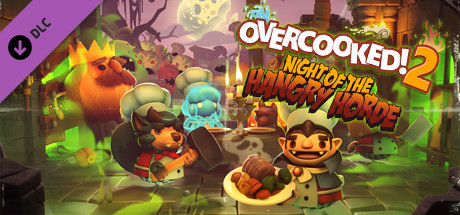
In Overcooked: 2: Night of the Hungry Horde, players will face the most terrifying threat the Onion Kingdom has ever seen: walking breadsticks! And this time, they've brought friends. The downloadable content includes a new horde mode where players will need to summon all their culinary knowledge to fend off an onslaught of sinister edible undead.
New mode! Eight levels with hordes of enemies, where players will have to fend off repeated attacks of edible undead, including walking breadsticks, giant zombie apples, and speedy zombie chili peppers.
Plus 12 new levels! Nine new kitchens and three hidden levels featuring Kevin.
Four new chefs! A vampire chef, a ghost chef, a werewolf chef, and the returning fan favorite, the box-headed chef from Overcooked!
New mechanics! The guillotine is great for chopping ingredients. And hurry up and throw some coal in the firebox to fry something up for dinner.
Three recipes! Fruit pies, soup, and fried dishes for dinner.
In Overcooked: 2: Night of the Hungry Horde, players will face the most terrifying threat the Onion Kingdom has ever seen: walking breadsticks! And this time, they've brought friends. The downloadable content includes a new horde mode where players will need to summon all their culinary knowledge to fend off an onslaught of sinister edible undead.
New mode! Eight levels with hordes of enemies, where players will have to fend off repeated attacks of edible undead, including walking breadsticks, giant zombie apples, and speedy zombie chili peppers.
Plus 12 new levels! Nine new kitchens and three hidden levels featuring Kevin.
Four new chefs! A vampire chef, a ghost chef, a werewolf chef, and the returning fan favorite, the box-headed chef from Overcooked!
New mechanics! The guillotine is great for chopping ingredients. And hurry up and throw some coal in the firebox to fry something up for dinner.
Three recipes! Fruit pies, soup, and fried dishes for dinner.
Minimum:
- OS: WIN7-64 bit
- Processor: Intel i3-2100 / AMD A8-5600k
- Memory: 4 GB RAM
- Graphics: GeForce GTX 630 / Radeon HD 6570
- DirectX: Version 11
- Storage: 3 GB available space
- Sound Card: DirectX Compatible Sound Card
If you are not familiar with the technical information of your PC, download the CPU-Z program. CPU-Z will give you detailed information about the main system components - CPU, RAM, video card - installed on your system, which you can then compare with the minimum requirements of the game.
- Go to: http://store.steampowered.com/ and download STEAM client
- Click "Install Steam" (from the upper right corner)
- Install and start application, login with your Account name and Password (create one if you don't have).
- Please follow these instructions to activate a new retail purchase on Steam:
- Launch Steam and log into your Steam account.
- Click the Games Menu.
- Choose Activate a Product on Steam...
- Follow the onscreen instructions to complete the process.
- After successful code verification go to the "MY GAMES" tab and start downloading.
Videos & Screenshots









- Payments
-

-

-

-

-

-

-

-

-
